How to Order Missing LEGO Pieces: A Complete Step-by-Step Guide

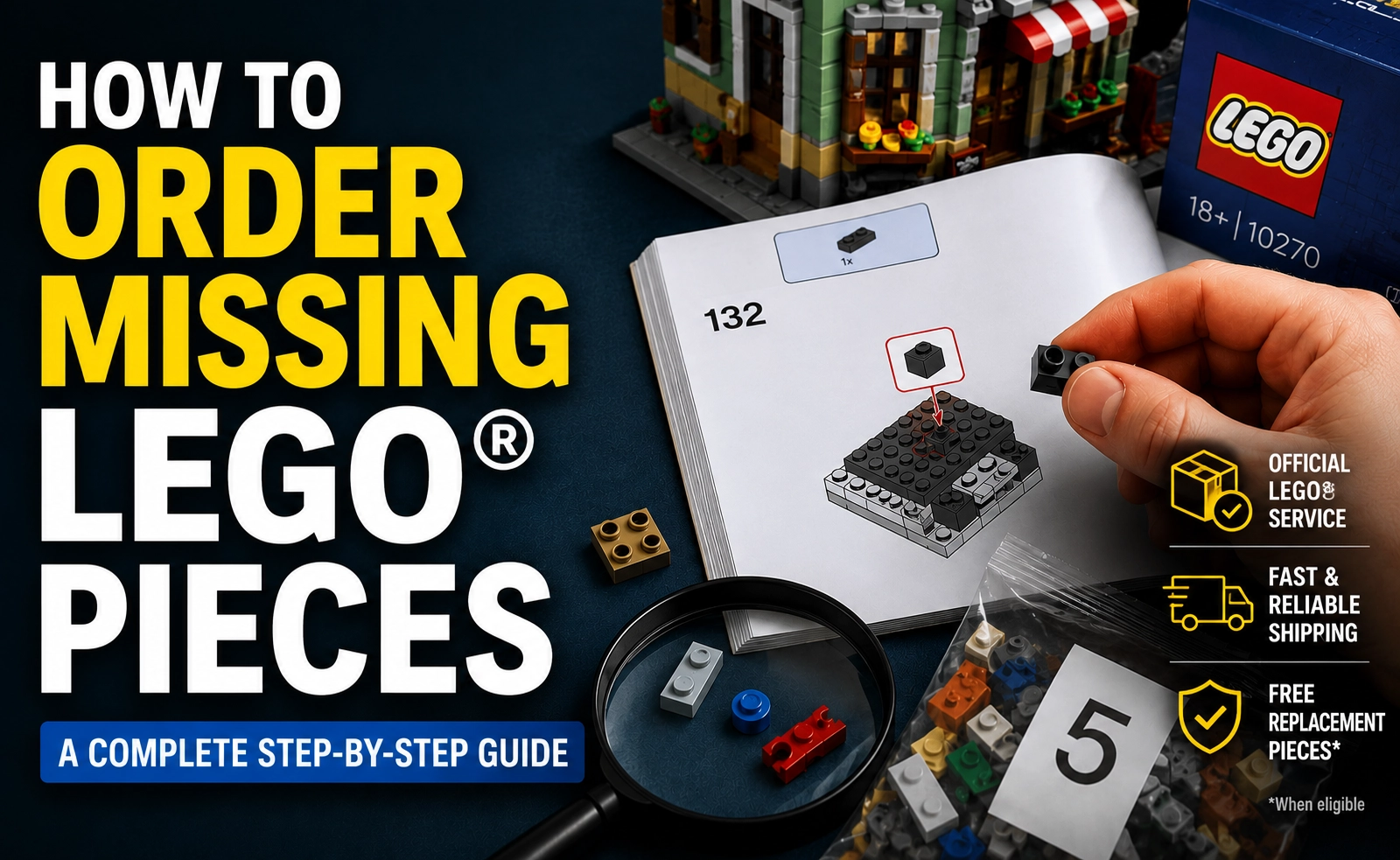
The Frustration
There are few things more frustrating than sitting down to build a new LEGO set, getting deep into the build, and suddenly realizing a piece is missing. One tiny brick can bring the entire project to a halt.
The good news is that LEGO has one of the best customer service systems in the toy industry. If your set is truly missing a piece, LEGO will usually replace it free of charge. The challenge is figuring out whether the part is actually missing or simply hiding somewhere in your build area.
Before you submit a replacement request, it is important to verify the piece is genuinely missing. In many cases, builders discover the “missing” part was stuck in a bag corner, used incorrectly in an earlier step, or hiding under the instruction booklet the entire time.
This guide walks you through exactly how to order missing LEGO pieces, how to verify a part is really gone, and how to avoid the most common mistakes builders make during the process.
Why LEGO Pieces Sometimes Seem Missing
LEGO sets go through strict quality control before leaving the factory, so truly missing pieces are relatively uncommon. Most missing-piece situations fall into one of these categories:
- The piece is still inside the plastic bag
- Another numbered bag has not been opened yet
- The wrong piece was used earlier in the build
- The piece fell onto the floor or under furniture
- The builder overlooked a color variation
- Small parts became trapped inside larger pieces
That does not mean LEGO never misses parts. It happens occasionally, especially in larger sets with thousands of pieces. Fortunately, LEGO’s replacement system is designed to handle these situations quickly.
Step 1: Identify the Missing LEGO Piece
The first thing you need to do is determine exactly which piece is missing.
Do not rely on memory or guesswork. Open your instruction booklet and locate the exact step where the missing piece appears.
Carefully note:
- The shape of the piece
- The color
- The size
- The quantity needed
- The step number
- The bag number
This becomes extremely important later when searching LEGO’s replacement parts system.
Some colors can look nearly identical under poor lighting. Black and dark bluish gray are common troublemakers. Tan and nougat can also look similar. Transparent pieces are especially easy to miss.
If your instruction booklet includes a parts inventory section near the back, locate the missing part there as well.
Step 2: Double Check the Plastic Bags
This is the step many builders skip, and it causes a lot of unnecessary replacement requests.
LEGO bags are notorious for trapping tiny pieces in corners and seams. Small plates, studs, and clips can cling to the plastic because of static electricity.
Take the bag and:
- Flatten it completely
- Check all corners carefully
- Turn it upside down
- Shake it gently
- Inspect folds and seams
Do this over a table or tray so the part does not bounce onto the floor if it suddenly falls out.
Many builders find the “missing” piece during this step alone.
Step 3: Verify You Opened Every Numbered Bag
Large LEGO sets often contain multiple bags with the same number.
For example, a set may include three separate Bag 5 packages. If you opened only one or two of them, the missing piece may still be sealed inside the remaining bag.
This is one of the most common reasons people think LEGO forgot a piece.
Before moving forward, line up all opened and unopened bags and verify every matching bag number has been opened.
Step 4: Search the Box Thoroughly
Some LEGO elements are packaged separately from the main bags.
Larger plates, sticker sheets, fabric pieces, flexible tubing, and instruction books may be loose inside the box or packed in smaller unnumbered bags.
Check:
- Under cardboard flaps
- Corners of the box
- Inside inner packaging
- Beneath instruction manuals
- Between folded cardboard inserts
Sometimes pieces become lodged in box folds during shipping.
Step 5: Review Your Previous Building Steps
This is where many “missing piece” mysteries get solved.
A piece may not actually be missing at all. Instead, it may have been used incorrectly several steps earlier.
Go back through your recent instructions and compare your build carefully to the diagrams.
Look for:
- Incorrect colors
- Similar-looking parts swapped accidentally
- Left and right wedge pieces reversed
- Plates of the wrong length
- Technic pins inserted into the wrong location
One incorrect piece placement can create problems several pages later when the correct piece is suddenly unavailable.
This happens constantly, even to experienced builders.
Step 6: Search Your Building Area
LEGO pieces have an almost supernatural ability to disappear.
Before ordering a replacement part, inspect your entire building area carefully.
Check:
- Under the table
- Beneath your chair
- Under instruction booklets
- Inside sleeves and pockets
- Carpet edges
- Couch cushions
- Nearby containers or trays
If you have pets or children nearby, widen the search radius significantly.
Tiny LEGO elements can bounce surprisingly far after hitting the floor.
A flashlight helps tremendously when searching carpet or dark flooring.
Step 7: Use the LEGO Parts Inventory
Most modern LEGO instruction booklets include a complete parts inventory near the back.
Use this section to verify:
- The piece belongs in the set
- The color is correct
- The quantity is correct
This helps avoid confusion between similar parts.
If your instructions do not include a parts inventory, you can usually find one online through LEGO’s building instructions database.
Step 8: Visit the Official LEGO Replacement Parts Page
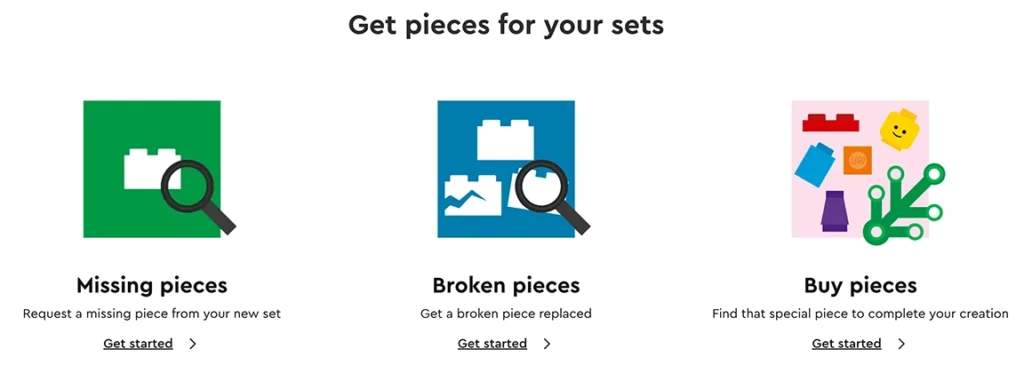
Once you are confident the part is truly missing, head to the official LEGO replacement parts system.
LEGO separates replacement requests into three categories:
- Missing pieces
- Broken pieces
- Buy pieces
Choose “Missing Pieces” for parts that were absent from a newly purchased set.
Using the wrong category can slow down the process.
The official LEGO replacement parts page is here:
https://www.lego.com/service/replacementparts
You can also access it through LEGO Customer Service.
Step 9: Enter Your LEGO Set Number
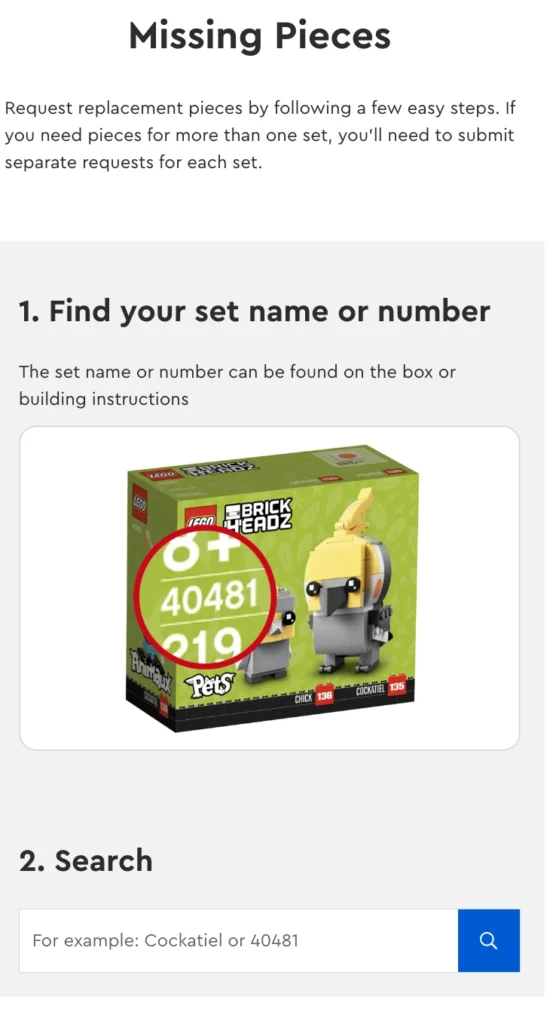
Next, LEGO will ask for your set number.
You can find the set number:
- On the front of the box
- On the spine of the instruction booklet
- Near the barcode
- On the product listing if purchased online
Enter the set number carefully.
Once submitted, LEGO will display a list of pieces associated with that set.
Step 10: Find the Missing Piece in LEGO’s Database
Now comes the important part.
Search through the parts list and locate the exact missing piece.
Take your time here. Some parts are extremely similar.
Verify:
- Color
- Shape
- Size
- Orientation
- Quantity
Once you locate the correct piece, add it to your replacement request.
If multiple pieces are missing, add them individually.
LEGO may limit excessive requests, so only request parts genuinely missing from the set.
Step 11: Submit Your Shipping Information
After selecting your missing LEGO pieces, LEGO will request your shipping information.
Fill out:
- Your name
- Mailing address
- Email address
LEGO usually ships legitimate missing pieces free of charge.
Shipping times vary depending on:
- Part availability
- Your location
- Warehouse inventory
- Seasonal demand
Most replacement requests arrive within a couple of weeks.
Step 12: Watch for Confirmation Emails
After submitting the request, LEGO typically sends a confirmation email.
Keep this email in case you need to follow up later.
Check your spam folder if you do not see confirmation within a reasonable time.
What If LEGO Does Not Have the Piece Available?
Occasionally, a part may not appear in the replacement system.
This can happen if:
- The set is retired
- The part is temporarily out of stock
- The element is extremely new
- The piece has been redesigned
If this happens, contact LEGO Customer Service directly.
Provide:
- Set number
- Part description
- Step number
- Color
- Quantity needed
LEGO support is usually very helpful when handling replacement requests.
What Is the Difference Between Missing Pieces and Pick a Brick?
A lot of builders confuse these systems.
LEGO’s Missing Pieces service is specifically for pieces absent from newly purchased sets.
Pick a Brick is different. It allows you to buy:
- Extra pieces
- Replacement pieces for older sets
- Bulk elements
- Custom building parts
If you lost a piece yourself, Pick a Brick is usually the correct option.
If LEGO forgot to include the part in a new set, use Missing Pieces instead.
Common LEGO Missing Piece Mistakes
Before submitting your request, avoid these common errors.
Requesting the Wrong Color
Lighting can make dark colors difficult to distinguish.
Always verify the exact shade before ordering.
Forgetting Another Bag Exists
Large sets frequently contain duplicate bag numbers.
Double check before assuming the part is missing.
Using the Wrong Piece Earlier
This is incredibly common.
A misplaced 1×2 plate can trigger confusion dozens of steps later.
Ignoring Small Bags Inside Larger Bags
Tiny elements are sometimes packed separately within larger bags.
Always inspect every bag thoroughly.
Ordering Too Quickly
Many missing pieces are eventually found during cleanup.
Spend extra time searching before submitting a request.
Tips for Avoiding Missing LEGO Pieces in the Future
A few smart habits can make building much easier.
Build in a Clean Area
Clutter increases the odds of losing small pieces.
Use a dedicated table or tray whenever possible.
Use Better Lighting
Good lighting helps distinguish similar colors and tiny parts.
Natural daylight works best.
Open One Bag at a Time
Avoid dumping multiple bags together unless the instructions specifically require it.
Use Sorting Trays
Small containers or sorting trays help keep parts organized during larger builds.
Keep Pets Away During Builds
Cats, dogs, and LEGO pieces are a dangerous combination.
Especially for minifigure accessories.
Does LEGO Really Replace Missing Pieces for Free?
Yes, in most legitimate cases.
LEGO has built a strong reputation for customer service, and they generally replace genuinely missing pieces without charging customers.
However, the system is monitored. Excessive or suspicious requests may be flagged.
Use the service honestly and responsibly.
Final Thoughts
Finding a missing LEGO piece can be incredibly frustrating, especially when you are fully invested in a build. Fortunately, most problems are easy to solve once you slow down and troubleshoot carefully.
In many cases, the part is not truly missing at all. It is simply hiding in a bag corner, sitting unopened in another numbered bag, or already attached somewhere earlier in the build.
Take your time. Double check everything. Search carefully.
If the piece really is missing, LEGO’s replacement parts system is straightforward and reliable.
A few minutes of detective work can save you time, frustration, and unnecessary replacement requests, while getting your LEGO build back on track as quickly as possible.